Structured Data for Local SEO
As an SEO freelancer, you have more time to focus on exciting topics: I used several business directories as data sources and created a list of local businesses and service providers in Germany to get started. Technically, there’s a lot more that’s possible, and I’ll continue to expand this case study from time to time.
I conducted a technical analysis of these local business websites to assess their use of structured data for local SEO. In doing so, I used code snippets from schema.org as markers for a custom search with Screaming Frog.
Case Study Featuring More Than 100,000 Local Businesses
TLDR, Top 3 To-Dos & Charts on Structured Data
Too long, didn’t read
Only a few local service providers and businesses take full or even partial advantage of the possibilities offered by structured data. Personal and organizational names, as well as phone numbers and email addresses, are particularly common. I assume this is driven by the setup processes of SEO plugins such as Yoast.
For SEOs, there is great potential in location-specific, product-specific, price-specific, and industry-specific awards and business hours. Furthermore, only about 5 to 10% of videos have markup.
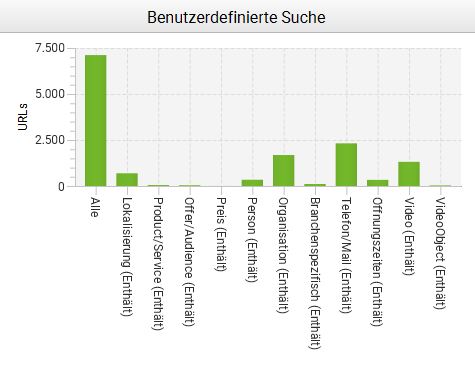
Top 3 Recommendations for Action
To differentiate your business from competitors, we currently recommend the following measures in particular, provided they are appropriate for each specific case:
- Localization: Only a small portion of the websites analyzed have location data stored via geotags or, alternatively, an address. As an SEO professional, you should definitely take advantage of this. Here’s a quick tip: you can also add geotags to photos taken on-site at local businesses. This adds about 2 KB per JPG and, in my opinion, doesn’t negatively impact performance. You just have to make sure you don’t tag and compress the images in that order—do it the other way around.
- Video Markup: I found such short image videos on just under 20% of the websites. The actual number is likely higher, since I only checked videos embedded via YouTube. However, of the videos I found, only just under 10% were labeled as VideoObjects. If you already have the video, you should definitely make this small effort and, for example, provide a transcript.
- ProfessionalService: For small, business-card-style websites—such as those for lawyers—it’s often worth marking up the services pages with the ProfessionalService schema. The reason is that such subpages are usually very similar and are therefore often completely removed from the index by Google as near-duplicate content. With the appropriate markup, I’ve personally been able to successfully counter this issue multiple times in such situations without changing the visible content. The Schema Product also works, but it can conflict with the widely used ProvenExpert seal. That’s because they also use this schema and then generate the star ratings using AggregateRating.
Data Set Generation & Statistical Analysis
Extraction, or: How Does Web Scraping Work?
A basic approach to extracting specific values from websites is to use an XPath. It’s particularly easy when the element in question is only displayed if a value is actually stored there. Here is the link to the corresponding guide from Screaming Frog on web scraping.
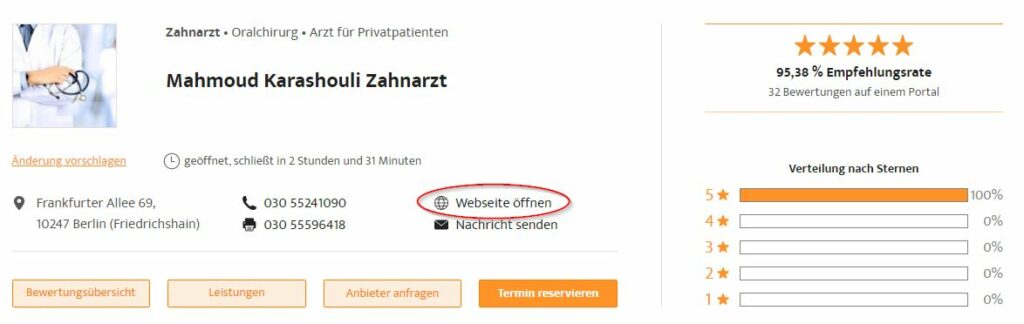
For example, in the profiles of some business directories, a button labeled “Open Website” or something similar appears when a domain is specified. To extract such domains of local businesses , I use a configuration that consists primarily of three elements: the Include function (or Custom Search), the Exclude function, and Custom Extraction.
In addition, Screaming Frog should be configured to crawl large websites by default. Here’s a link to a Screaming Frog guide for more tips and tricks: How to Crawl Large Websites. I use Google Bot Mobile as the user agent.
- I use the first crawl to identify relevant subpages within a specific segment, such as car dealerships. I start with a category page.
- Whenever possible, I use the URL structure via the the `include` function with a regular expression (.*autohaus.*) This is the fastest method because it ensures that only relevant URLs are crawled.
- In principle, you can also use a Custom Search for text in the frontend. However, this requires scanning the entire website, which takes a loooong time and can easily push local devices to their limits. For this approach, you’ll usually need the Exclude function , for example, for widget URLs. I always start by refining the list of URLs to exclude for the respective website over a few iterations. Only then do I start the full crawl. This often saves several million URLs, which noticeably speeds up the process.
- In the second crawl, I continue to use the “Include” and “Exclude” functions, but now I use the URLs identified in the first step as a list in upload mode as my starting points. In practice, this allows me to find significantly more local businesses in the respective business directory during the second pass. In addition, in the second step, I work with a custom extraction of the elements I’m looking for using an XPath. Here’s an example of what that looks like: //a[@class=”inline-flex items-center”].
Cleaning of Extracted Data
Another step that is usually necessary is the subsequent cleaning of the extracted data. This is because XPath always extracts the entire element at once. Here are my intermediate steps:
- The amount of data in a crawl like this can easily become too large for Excel or Google Sheets. A bigger problem than the number of rows is often the number of cells, because Screaming Frog creates a new column for each custom search and each custom extraction. As a result, you can quickly end up with hundreds of thousands of cells. However, with the right configuration, you can filter out a lot of data right within Screaming Frog. If the export function still spits out too much data, you can manually split up the data to be exported if necessary. For example, by holding down the Shift key, you can select rows 1 through 10,000 and then copy and paste them. Repeat this until all relevant data is transferred to either Excel or Google Sheets.
- The unwanted bycatch is another issue when extracting data with XPath. The entire content of the respective element is extracted. This includes, for example, link attributes and CSS classes. However, you can easily clean this up in Google Sheets, for example, using “Find & Replace” in combination with some regular expressions. You should also be mindful of issues like trailing slashes and remove such duplicates using logic.
Once you have a cleaned-up list of domains, you can export them as a CSV file. You can use this file format in Screaming Frog under “Mode” >> Upload the “list.” Then it’s time to move on to the actual analysis of the structured data for local SEO.
Analysis of Structured Data for Local SEO
To analyze how local businesses use structured data, I ran a third crawl for each individual segment. This crawl is based on the list of domain addresses obtained through the first two steps.
Homepages of Local Businesses
To manage the volume of data, I included I checked only the homepages . I consider this methodologically sound, because structured data for local SEO should be found on the homepage of a local business.
This third crawl in each case is essentially based on a standardized configuration of Custom Search. This includes a category that I use to create individual markups for industries . To reduce the number of cells required, I linked the individual search terms in this category with an “OR.” It looks something like this, for example:
“AutomotiveBusiness”|”AutoBodyShop”|”AutoDealer”|”AutoPartsStore”|”AutoRental”|”AutoRepair”
Complete list of Custom Search values
You shouldn’t overload Custom Search, because otherwise too many calculations will be required for the analysis. At the very latest when your device crashes, you’ve gone too far with the number and/or combination of search terms.
To provide as comprehensive a picture as possible of how local businesses use structured data, I have created several categories. Based on my practical experience, I have also I also looked for videos . The use of a video is a strong indicator of a willingness to invest in online marketing. In many cases, however, the embedding is not ideal.
- Location: GeoCoordinates or PostalAddress or AreaServed
- Product/Service:
- Product or ProfessionalService
- Offer or Audience
- Price or PriceRange or LowPrice or HighPrice
- Business/Industry:
- Person
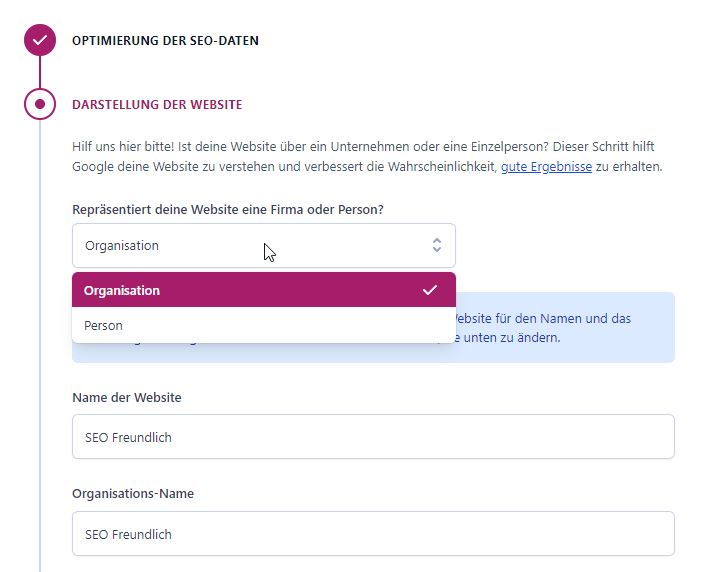
- Organization or LocalBusiness or ContactPoint
- Industry-specific search values e.g. AutoDealer
- Kontaktinformationen:
- Use of Videos
- YouTube or Vimeo or MP4
- VideoObject
| Industry | Total | Local | Product | Offer | Price | Person | Business | Specific | Mail/Tel. | Times | Video |
|---|---|---|---|---|---|---|---|---|---|---|---|
| Agencies | 4242 | 270 | 72 | 34 | 0 | 176 | 969 | 45 | 1187 | 72 | 749 |
| Lawyers | 6642 | 450 | 72 | 56 | 1 | 223 | 1165 | 189 | 1782 | 229 | 502 |
| Pharmacies | 6628 | 2984 | 81 | 93 | 0 | 1286 | 2250 | 2753 | 3811 | 934 | 364 |
| Architects | 7130 | 265 | 11 | 35 | 0 | 109 | 930 | 11 | 1296 | 114 | 481 |
| Doctors | 7116 | 692 | 51 | 41 | 3 | 340 | 1683 | 110 | 2318 | 334 | 1314 |
| Car dealerships | 1736 | 244 | 3 | 10 | 0 | 26 | 310 | 99 | 677 | 90 | 445 |
| Bars/pubs | 2378 | 123 | 3 | 3 | 1 | 36 | 290 | 50 | 561 | 93 | 203 |
| Organic grocery stores | 729 | 49 | 21 | 2 | 0 | 28 | 75 | 30 | 162 | 11 | 89 |
| Bookstores | 1836 | 181 | 5 | 4 | 2 | 35 | 129 | 152 | 752 | 34 | 190 |
| Cafés | 5657 | 323 | 12 | 14 | 4 | 96 | 734 | 136 | 1334 | 203 | 523 |
| Consultants | 1754 | 64 | 14 | 5 | 0 | 63 | 317 | n.a. | 446 | 27 | 270 |
| Ice Cream Shops | 1495 | 68 | 2 | 5 | 1 | 28 | 139 | 25 | 320 | 80 | 99 |
| Nutritionist | 422 | 42 | 5 | 2 | 0 | 30 | 121 | 0 | 159 | 13 | 77 |
| Vacation Rental | 1705 | 66 | 14 | 15 | 3 | 54 | 170 | 32 | 340 | 34 | 126 |
| Fitness studios | 2161 | 194 | 16 | 5 | 2 | 90 | 487 | 117 | 846 | 139 | 745 |
| Hairdressers | 1769 | 106 | 4 | 14 | 0 | 44 | 259 | 38 | 450 | 95 | 199 |
| Alternative Practitioner | 2979 | 178 | 13 | 15 | 2 | 138 | 504 | 23 | 683 | 66 | 282 |
| Real estate agent | 1468 | 215 | 51 | 11 | 6 | 83 | 417 | 6 | 644 | 109 | 416 |
| Jewelry Stores | 1656 | 84 | 9 | 8 | 3 | 36 | 217 | 24 | 401 | 40 | 138 |
| Notaries | 1512 | 101 | 3 | 21 | 0 | 37 | 257 | 34 | 423 | 48 | 75 |
| Optician | 1491 | 160 | 2 | 55 | 0 | 47 | 311 | 80 | 573 | 98 | 217 |
| Restaurants | 9419 | 587 | 18 | 45 | 7 | 174 | 1135 | 582 | 2422 | 417 | 696 |
| Toys | 657 | 25 | 6 | 3 | 3 | 12 | 96 | 1 | 230 | 11 | 103 |
| Tax consultant | 2805 | 127 | 11 | 27 | 0 | 65 | 412 | 33 | 723 | 86 | 220 |
| Moving Companies | 1018 | 137 | 15 | 13 | 0 | 54 | 294 | 5 | 513 | 75 | 134 |
Here is the list of footnotes regarding the analysis of the use of structured data for local SEO in Germany:
- This analysis combines hairdressers and dog groomers.
Key Takeaways from the Analysis
- Virtually no website belonging to a local business or service provider is fully optimized.
- Plugins are likely the driving force behind the relatively high number of organizational markups as well as email and telephone markups. For example, the Yoast plugin for WordPress includes corresponding free-form fields in its setup process that can be filled out even without specialized knowledge. This likely contributes significantly to the relatively high baseline of structured data in these categories.
- Websites for branches of large chains tend to be better positioned: For example, among opticians, Apollo’s individual locations generate well over half of all Offer/Audience markups. The lion’s share of the posted business hours, on the other hand, comes from Fielmann locations.
Using Structured Data for Local Businesses Yourself
Cleaning and Combining Structured Data
Optimizing structured data for local SEO naturally begins with reviewing the current setup. One problem SEOs face in this regard is the knee-jerk approach taken by some plugin and theme providers.
For example, the Astra theme for WordPress used on this website includes default markup, such as for the footer. With all due respect… that’s data clutter and also contradicts John Mueller’s statements on the subject.
But overall, the Astra theme is very good, and you can use a small PHP snippet to disable the structured data—either individually or all at once. Here’s what it looks like; add it to functions.php:
add_filter( ‘astra_schema_enabled’, ‘__return_false’ );
After removing spammy schemas, you can essentially start from scratch. There are at least two aspects to consider here:
- Duplicate Markups For example, using the Schema Product schema twice can cause search engines to ignore both markups. This can also happen unintentionally, such as when services are marked up as “products” in combination with the ProvenExpert seal.
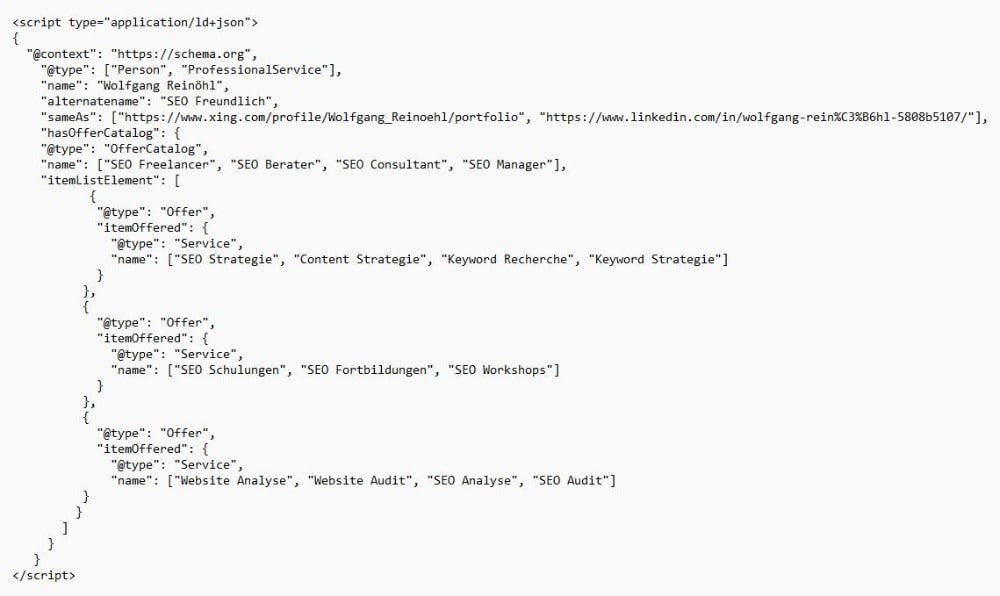
- Combinations of different schemas within a markup are recommended, according to a statement by John Mueller on Twitter. For example, “Person” and “ProfessionalService” can be combined effectively and are particularly well-suited for local service providers. Both parallel and serial combinations are technically valid. Personally, I tend to use the parallel combination in such cases because the serial variant is more time-consuming when writing scripts. Here’s a link to an interesting guide on Stack Overflow.
Request Appointment
- Get in Touch: You can contact me by phone, email, or through the form.
- Discuss Project: I will first take a thorough look at the project, and we will then discuss the technical and business situation in detail.
- Written offer: Based on this meeting, I prepare a written offer with a detailed list of the planned measures.